

What Makes a Website Feel Professional and Trustworthy?
First impressions online happen fast.
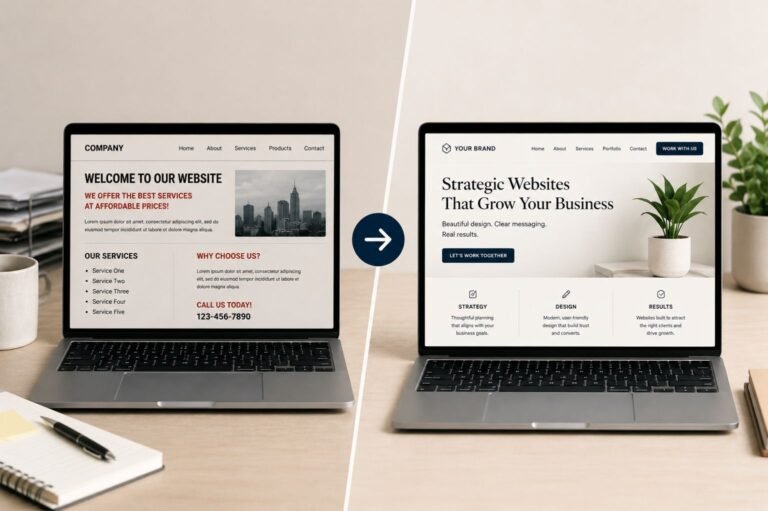
Within seconds of landing on a website, visitors are already forming opinions about the business behind it. A website that feels polished, organized, and easy to use immediately creates confidence, while a cluttered or outdated website can quickly reduce trust.
A professional website is not just about looking modern. It’s about creating an experience that feels clear, intentional, and reliable.
Why Website Trust Matters
Your website is often the first interaction someone has with your business.
Before contacting you, making a purchase, or booking a service, visitors are subconsciously asking themselves if the business feels credible, trustworthy, and professional. Even small design decisions influence those perceptions.
1. Clear, Simple Messaging
One of the biggest reasons websites feel unprofessional is unclear communication.
Visitors should immediately understand what your business does, who you help, what makes you different, and what action they should take next. When messaging feels vague or overly complicated, users often lose interest quickly.
Clear headlines, concise descriptions, and strong calls-to-action help create a more confident user experience.
2. Consistent Branding
Professional websites feel cohesive.
That consistency comes from maintaining the same visual style throughout the site, including typography, colors, spacing, imagery, and button styles.
When branding changes from section to section, the website can feel disconnected or unfinished. Consistency creates familiarity, and familiarity helps build trust.
3. Clean Layouts and Spacing
Overcrowded websites often feel stressful to navigate.
Professional websites use spacing intentionally to improve readability, separate content, and guide the user’s attention naturally through the page.
Whitespace is not wasted space. It helps users process information more comfortably and creates a cleaner overall experience.
Too many colors, oversized text blocks, excessive animations, or inconsistent spacing can quickly make a website feel cluttered.
4. Mobile-Friendly Design
A website that works poorly on mobile devices immediately damages credibility.
Today, many visitors browse almost entirely from their phones. If users need to zoom in, struggle with navigation, or wait for slow pages to load, they are far more likely to leave.
A strong mobile experience includes readable text, clear navigation, fast-loading pages, optimized images, and buttons that are easy to tap.
Mobile responsiveness is no longer optional. It’s expected.
5. High-Quality Visuals
Visual quality strongly affects how professional a business appears online.
Low-resolution images, inconsistent graphics, or outdated visuals can make even a great business feel less credible.
Professional websites typically use intentional imagery, cohesive graphics, organized layouts, and a consistent visual hierarchy that supports the overall brand experience.
The goal is not to overwhelm visitors with design. It’s to create clarity and reinforce trust.
6. Strong User Experience (UX)
A professional website feels easy to use.
Visitors should never feel confused about where to click, how to navigate, or how to contact the business.
Good UX design removes friction and helps guide users naturally through the site. Simple navigation, organized page structure, fast load times, and clear calls-to-action all contribute to a smoother experience.
The easier a website feels to use, the more trustworthy it tends to feel.
7. Trust Signals
Professional websites reinforce credibility through trust-building elements.
Testimonials, reviews, project portfolios, case studies, and clear contact information all help visitors feel more confident in your business.
People want reassurance before taking action online, especially when they are considering a purchase or service inquiry.
8. SEO and Website Structure
Search engine optimization also contributes to professionalism.
Well-structured websites tend to load faster, organize information more clearly, and create a better overall user experience.
Good SEO practices often overlap with good UX. Organized headings, mobile responsiveness, internal linking, accessibility, and optimized metadata all help create a more polished and functional website.
9. Clear Calls-to-Action
Visitors should always know what step to take next.
Whether the goal is scheduling a consultation, requesting a quote, making a purchase, or contacting your business, the path should feel clear and intentional.
Simple and direct calls-to-action like “Start Your Project,” “Request a Quote,” or “View Portfolio” help guide users naturally through the experience.
Building a Website People Trust
A professional website is not about adding more design elements. In many cases, it’s about simplifying the experience and creating clarity.
The websites that feel the most trustworthy usually share a few key qualities: clear messaging, organized structure, cohesive branding, strong mobile usability, intentional user flow, and consistent visuals.
When those elements work together, your website becomes more than just an online presence. It becomes a tool that helps build trust, strengthen your brand, and support long-term business growth.